Atomicity Wiki
 Wiki Home
- Updates
- Activities
- Quests
- Achievement Diaries
- Clue Scrolls
- Minigames
- Bosses
- Items
- Items
- Weapons
- Armour
- Jewellery
- Capes
- Ammunition
- Other items
- All items
- Skills
- Agility
- Attack
- Construction
- Cooking
- Crafting
- Defence
- Farming
- Firemaking
- Fishing
- Fletching
- Herblore
- Hitpoints
- Hunter
- Magic
- Mining
- Prayer
- Ranged
- Runecrafting
- Slayer
- Smithing
- Strength
- Thieving
- Woodcutting
Update:Smithing, Settings and Skillcapes
Smithing, Settings and Skillcapes
26 November 2026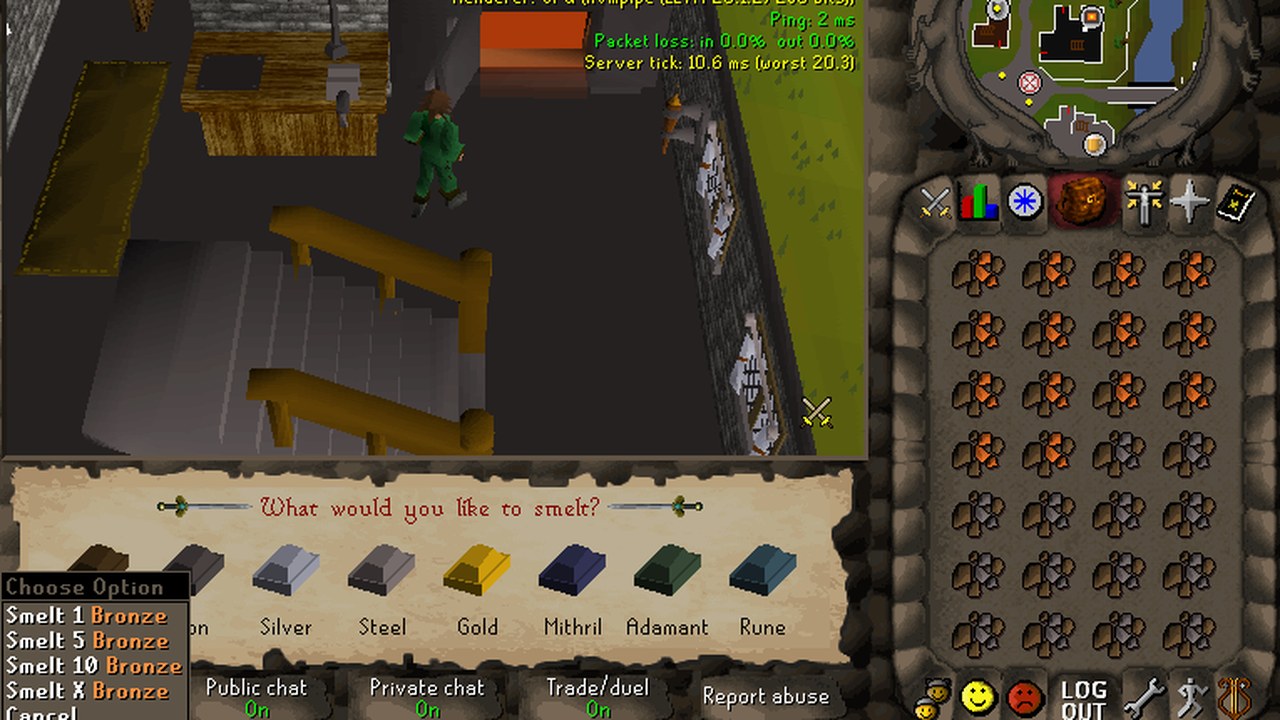
Smelt and smith five, ten or as many as you like, buy your skillcape from the master of your skill, keep your settings on every computer, crawl under walls, squeeze through fences, see on the wiki what monsters drop and which spells need each rune, and no more disappearing doors.
Client: Rosebud Alpha feature 81, hotfix 25 (0.81.25) · Server: Rosebud Alpha feature 24, hotfix 29 (0.24.29)
 Features
Smithing
- Right-click a bar on the furnace's menu to Smelt 1, 5, 10 or X of it.
- At an anvil, Make 5, Make 10, Make All and Make X hammer out one at a time, a swing for each, until they're done or you run out of bars. See Smithing.
 Skillcapes
- Each skill's master sells its cape of accomplishment, with its hood, for 99,000 coins to anyone who has reached level 99 in it: talk to the master and you'll be offered it. With more than one 99, you get the trimmed cape. See Capes for who sells which.
- New in the world to sell them: Ajjat and Sloane in the Warriors' Guild, the Master fisher in the Fishing Guild, Cap'n Izzy No-Beard at the Brimhaven Agility Arena, Ignatius Vulcan south of Seers' Village, a dwarf in the Mining Guild, the Woodsman tutor in Lumbridge and Martin the Master Gardener in Draynor Village.
- The Wise Old Man in Draynor Village sells the
 Quest point cape once you've completed every quest.
 Settings
- The game sends you less data as you play: everything the server sends is compressed, and someone coming back into view who looks the same isn't sent their look again (with this version of the game).
- Game updates download from Cloudflare's network, from somewhere close to you, so they're quicker wherever you play (with this version of the game; older ones still download them from the game's own server).
- A new Network setting, with the video settings, shows your ping and your packet loss in and out next to the performance numbers.
- Your settings are kept with your account, so they're the same on any computer you play on: the settings tab's (brightness, music and sound effect volumes, mouse buttons, chat effects, split private chat), roofs, GUI scale, the performance and network numbers, XP drops (on or off, combined or by skill), the Game chat tab, your tab hotkeys and Press a key to chat. The first time you log in after this, an account takes the ones that computer last had.
- Login music, render distance, vsync, the renderer and the world you last picked stay with each computer, since they're about the computer or chosen before you log in.
- The house options have their own panel: building mode, guests, leave the house and expel your guests.
 The wiki
- Pages are wider, and the side panels sit out towards the edges of the window.
- Item pages start by saying what the item is and what it's for, then where it comes from: who drops it, which shops sell it, how it's made (a steel bar's iron ore and coal), and who sells each skillcape.
- Every skill's page has its icon and its level-up jingles to play, and says who sells its cape.
- Pages start their box with when what they're about was released, linked to the update that brought it.
- The Quest point cape page shows the highest level each quest needs, under its requirements, a skill icon each.
- Each update says which versions of the game it brought, and the bottom of every page says when it last changed, in your own time.
- The Main Page is now Wiki Home.
- Drop tables look like the Old School wiki's: each item's picture before its name, and a Rarity column coloured by how likely the drop is, from always (blue) through common, uncommon and rare to very rare (red).
- A link to an item shows the item's picture before its name, on every page.
- Every rune's page has a Spells table: each spell that uses the rune, its spellbook and Magic level, how many runes a cast takes and what other runes (or staff) it needs. It's read from the game's spellbooks, so new runes and spells are there by themselves. The god staffs, Iban's staff and the Slayer's staff list their spells too.
- Each skill's level-up jingles play from a small player under the box at the top of its page.
- The Runecrafting page shows where every altar's ruins are, a map of each.
Runecrafting
- The ruins of each runecrafting altar are marked on the minimap and the world map with a runecrafting icon.
Quests
- The Wise Old Man's house in Draynor Village has the quest icon on the minimap and the world map: it's where Adventures of Youth starts.
 Hotfixes
Smithing
- You walk to the furnace and smelt standing right in front of its door, facing it, instead of beside it and half behind the open door.
Settings
- The renderer setting's two choices are now GPU and CPU.
- Your video settings are no longer lost when the game reconnects you.
- The music and sound effect volumes no longer carry over from the last account you played on while the settings tab showed another.
- The house options' buttons don't change your brightness any more.
- Your total level counts your Construction and Hunter levels too.
Construction
- Going in by Go to your house turns building mode off, and by Go to your house (building mode) turns it on; the house options always show which.
- The estate agent is back in his office in Falador, and walks about in it.
- The Yanille house portal has moved a little north, off the path and onto the grass.
 Sounds
- Unlocking your bank with your PIN plays the bank's two-note chime after the lock's click.
- Every skill's level-up jingle is checked: Construction and Hunter play their own, and Mining and Smithing were swapped round.
Agility
- The underwall tunnels: you bend down into the hole first, and only then move, crawling along under the ground, and you stand up only as you climb out of the far hole, instead of sliding along, standing up halfway and walking through the wall.
- On the way under you're hidden by the ground, seen only through the holes, and in a hole you're in front of its far side and behind its near one.
- The holes are holes: their insides no longer show through the grass around them (the line of dirt floating over them from some angles), and they face the wall, their tunnels heading under it.
- Click a hole from anywhere, even from the side, and you walk straight to the front of it and go in.
- You hear yourself squeezing in, scrambling along and squeezing out.
- The grass round the holes sits on the ground instead of floating over the slope.
- The gap in the fence between Lumbridge's churchyard and the swamp: you shimmy through it sideways instead of jumping straight to the other side. Click it from anywhere and you walk (or run) to the gap on the nearer side, face it and squeeze through.
Runecrafting
- The mysterious ruins round each runecrafting altar are back: only their pillars and rubble were showing.
- The Runecrafting page's skill icon shows, instead of the code for it.
 Bonfires
- The bonfire in Lumbridge has moved from by the fountain to the riverbank south of town, beside the fishing spots.
- The bonfire in Draynor Village has moved from the market square to the grass west of the bank, by the trees.
Adventures of Youth
- The library after the Blue Moon Inn: as the camera zooms in at the start, you're in front of the desk the whole way instead of hidden behind it and the chair, and the chair's seat no longer shows through you while you sit.
- In every library scene the middle bookcase is Search like the others (it was Check, which did nothing).
Fires
- You can't light a fire in banks, the Duel Arena, Pest Control, the Fight Caves and Pits, the God Wars Dungeon, Castle Wars or the Dwarven Mine. See Firemaking.
Other fixes
- No door or gate disappears when you open it, from whichever side or room you click it.
- The Master Chef's skin tone matches the Atomicity Guide's.
- Two of the bankers, Bob in Lumbridge, a student at the Dig Site and the archaeological expert have the same skin tone as a new character.
- Sir Tiffy Cashien's feet no longer sink into the ground.
- You no longer get cut off at the side when you kneel to light a fire.
Every update is on the Updates page.
Category: Updates
This page was last changed on .